
Extensions / plugin API v2
Programs Heresia hosts.
Not code it trusts.
An extension is a folder with a manifest and a WebAssembly module. It does its own work in its own process; Heresia hosts it, draws what it declares, and checks every call against what you granted.
Development contracts. The manifest schema, the module ABI, the service routes and the local control channel are separate interfaces, and they are not a stable external SDK yet. There is no extension store, and Heresia bundles no extension: it starts complete without any.
What an extension can add
Extensions describe pages, tabs, cards, buttons and statuses as data in their manifest, in the same toolkit-neutral items whatever the way they run. The window draws them with its own controls and checks every placement and action against the package you approved. Nothing an extension adds is named in the application itself.
| Placement | Where it appears | Grant |
|---|---|---|
workspace | A tab in the main navigation, and only after you switch that page on in Settings. | workspace |
side-panel | A panel at either edge of any view. | side-panel |
device-card | A selectable card, with its details, in Performance. | device-card |
process-column | A column of the process table. | process-column |
process-menu | Entries in a process's context menu; the action receives that process. | process-menu |
inspector-tab | A tab in the process inspector, following the selection. | inspector-tab |
status | A segment of the status strip, optionally for chosen views only. | status |
settings-section | The extension's own section in Settings → Plugins. | settings-section |
With hosted-page and canvas a workspace page can also receive local input and viewport events and replace a bounded canvas of rectangles, lines and circles, without any code being loaded into the window. A canvas must be declared in the manifest; consent to a plain page does not authorize a canvas added later. With app-control an extension can replace or hide host elements such as the Devices panel, a process column or a whole view, move panels between views and edges, and run host commands.
Permissions, in the host's words
These are the labels and prompts Heresia itself writes. A package cannot substitute its own permission text. Declarations grant nothing: installing, approving the exact package bytes, granting permissions and enabling are separate steps, and a workspace page also needs its own switch in Settings. Grants limit what the host does for an extension; they do not limit operating-system rights.
Workspace
workspaceAdd a page to the main navigation.
Page lifecycle
hosted-pageReceive events for this extension's open pages.
Hosted canvas
canvasDraw and receive local activation in this extension's own page surfaces.
Side panels
side-panelAdd panels and receive their placement in the window.
Process columns
process-columnAdd columns and populate their cells.
Process menu
process-menuAdd actions that receive the targeted process, including its executable path.
Process inspector
inspector-tabAdd an inspector tab and receive the selected process, including its executable path.
Status bar
statusAdd information and actions to the status bar.
Settings
settings-sectionAdd a section to this plugin's settings.
Notifications
notificationsShow in-app notifications.
Device cards
device-cardAdd a selectable card and its details to Performance.
Process inventory
process-dataRead the process count and changes to process IDs, names, start times and executable paths.
Control application
app-controlOverride built-in UI, change panel layouts and invoke host commands.
Extension services
service-bridgeExchange messages only with named extensions on approved service routes.
Search commands
search-commandsHandle registered commands submitted in Search, without receiving other search text.
Network
networkSend HTTPS requests to the origins this extension declares.
Executable contents
executable-readRead and hash executables of processes this extension receives.
Private storage
storageKeep this extension's own data between runs.
Host services
Everything an extension cannot do for itself it asks the host for, through a reserved provider named heresia. They are the same four generic services for every extension: an extension that needs HTTPS, executable hashing, private storage or timers uses them like any other, and the application has no code specific to one extension. Each call needs an exact import in the manifest and only the grants listed for that method.
| Route | Grants needed | What it does |
|---|---|---|
http.request | network | HTTPS GET, POST or PUT to an origin the manifest declares. A file upload also needs executable-read and a one-use confirmation. |
files.sha256 | process-data executable-read | The SHA-256 and size of the executable of a process the extension was given; never its bytes. |
storage.get | storage | Read a JSON value and its revision from the extension's own namespace. |
storage.put | storage | Write a value, optionally only if the revision still matches (compare and set). |
storage.delete | storage | Delete a key, optionally only at an expected revision. |
storage.list | storage | List the extension's own keys. |
time.now | none | The host's wall-clock time in milliseconds. |
time.sleep | none | A timer: a reply after 1 ms to 1 hour. |
- HTTPS, to declared origins only. The manifest lists one to eight exact origins, without wildcard hosts or IP literals. The host makes GET, POST and PUT requests without a proxy and follows no redirects.
- Secrets stay with the host. A secret setting lives in the operating system's credential store. The extension is told only whether it is set, and can use it only through a binding in a request to a declared origin. A response that echoes the bound value is refused.
- Hashing returns a hash. The host hashes the executable of a process it handed to the extension and returns the SHA-256 and the size, never the bytes. An upload is possible only after you confirm that action for that process; the authority is single-use and expires after 120 seconds.
- Private storage. Each extension gets its own namespace of JSON values, at most 512 KiB per value, 8 MiB and 256 keys in all, with revisions for compare-and-set writes. Uninstalling removes it.
- Limits on everything. Per extension, HTTP allows 2 simultaneous jobs and 30 starts a minute, every job has a 30-second deadline, and a request over a limit is refused with a fixed text that does not say whether the resource exists.
- Extension to extension. Only along routes both sides declare, and only when you granted
service-bridgeto both.
Isolation
- The window never loads guest code. Each worker generation has its own supervised transport, and a permission change retires the running generation instead of altering its authority in place.
- WebAssembly gets almost nothing. A module runs in its own worker process through a bounded interpreter. It can call only
receiveandsend; no WASI or other system imports are linked. A module is limited to 8 MiB, its memory to 64 MiB and its run to a fuel budget. The canvas worker checks every display list before it reaches the window. - Native code is possible, and fenced. A native library or executable lacks the interpreter's isolation. On Linux it runs only inside a Bubblewrap sandbox with a read-only copy of the package, private scratch space, and no host home, network or desktop session; if the sandbox cannot be established, Heresia refuses to run it. Sandboxing native extensions on Windows is not implemented.
- A failing extension is stopped on its own. The design rule is that an extension cannot stop, block, slow or disconnect the application, and what it sends is treated as untrusted. Oversized frames, floods and malformed traffic are stopped without reaching the host queue, and the test strategy lists which of these have tests.
- Approval is bound to the package. It covers a digest of the whole package, resources and scripts included, so any change needs a new review. The digest proves integrity, not the identity of the publisher and not safety.
Install, review, enable
Install: read it, then hold
In Settings → Plugins choose Install plugin and select the package folder or its
heresia-plugin.toml. Read the outside-store notice to the end and hold Hold to agree for 2.5 seconds, then review the license and the notice and choose Accept TOS. Nothing is granted and nothing starts.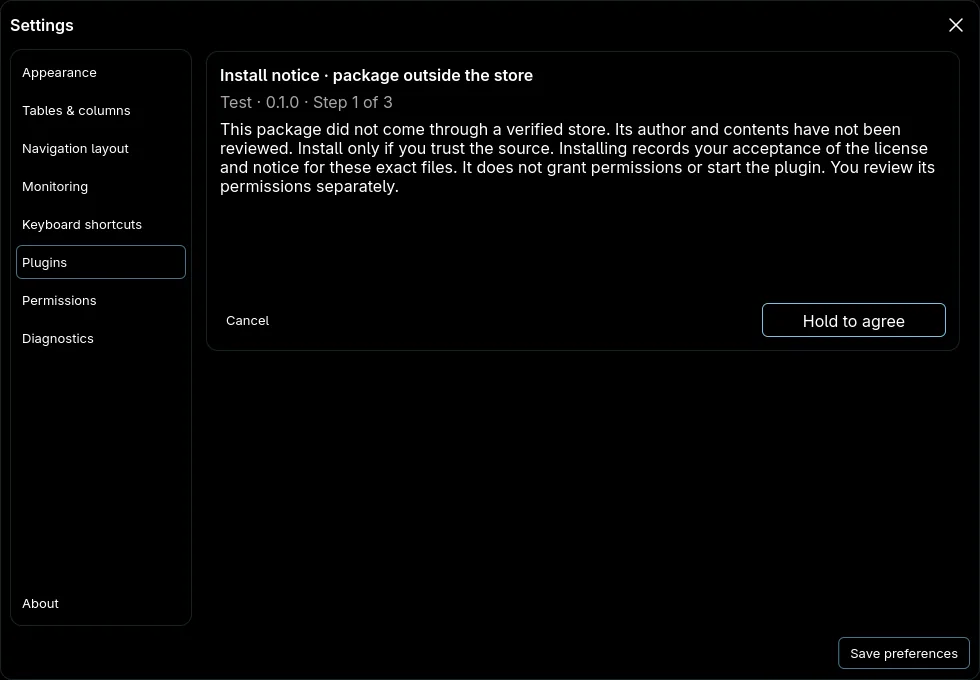
Installing an extension from outside a store starts with a notice and a deliberate hold. It grants nothing and starts nothing. Capture with the project's Test extension. Review the permissions
In Settings → Permissions expand the extension to see what it asks for and which service routes it declares. Save permissions stores exactly your choices (an empty set is valid) and does not start the extension.
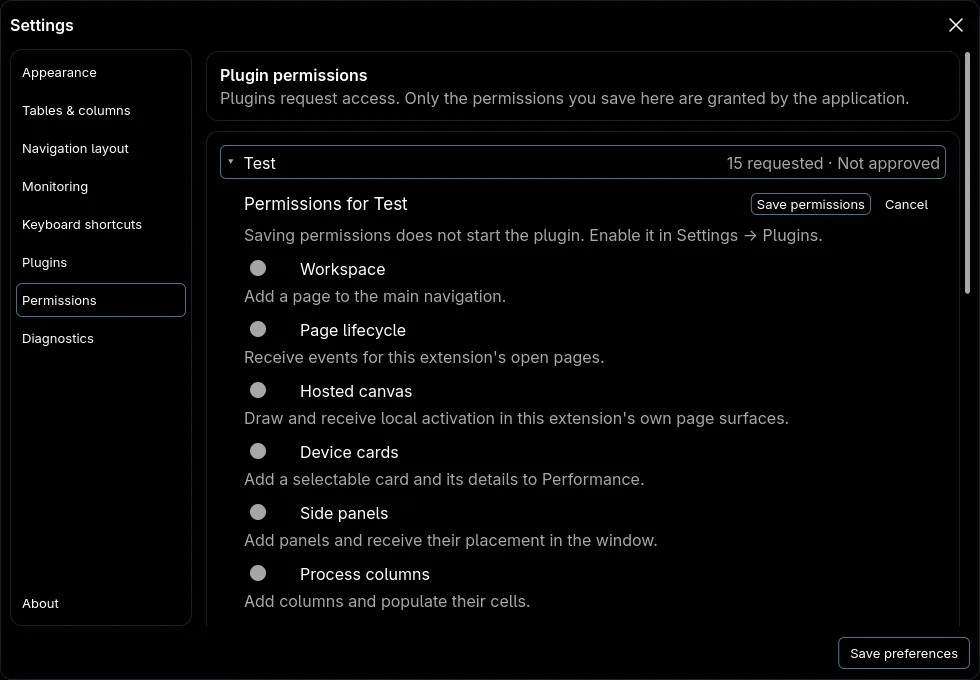
Permissions are worded by Heresia, not by the extension, and saving them does not start it. Enable it
In Settings → Plugins, Enable starts the approved package. Disable stops it without forgetting your approval; Uninstall stops it, archives the package and removes its private storage. Each page an extension offers appears only after its own switch is on, and neither the extension nor the command line can turn it on.
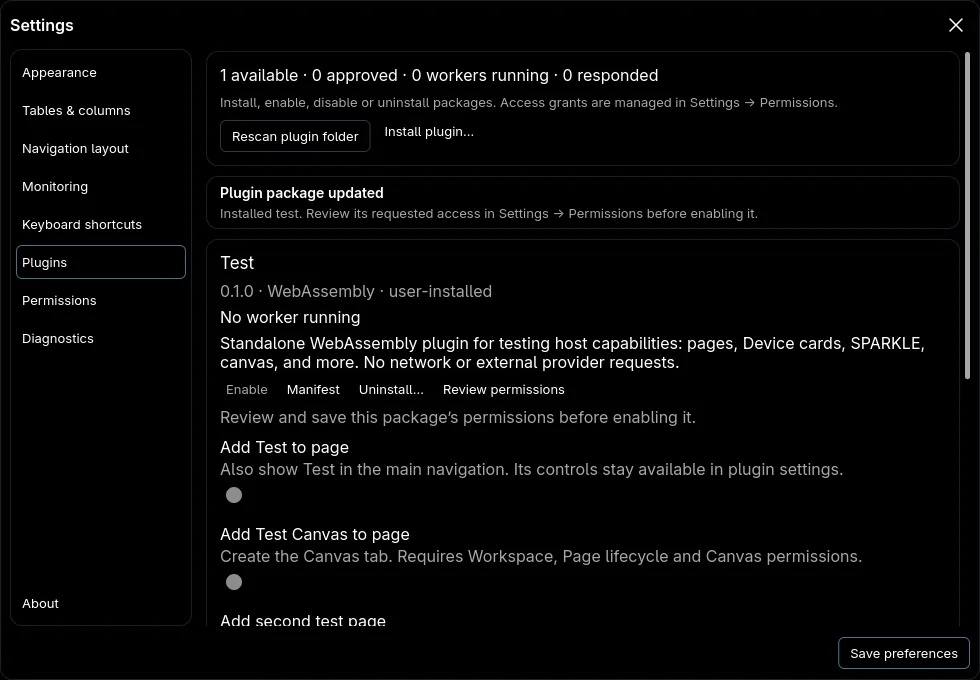
Installed does not mean allowed: the extension waits for its permissions to be reviewed, and every page it offers has its own switch, off by default.
The same steps exist on the command line, with the same review:
heresia plugin-install ./my-extension     # preview: id, digest, license, notice, warning
heresia plugin-install ./my-extension --accept DIGEST --accept-outside-store-risk
heresia plugins                           # installed: requested permissions, saved grants
heresia approve-plugin ID --program DIGEST
heresia grant ID --allow storage          # replaces the grant set; none given revokes all
heresia enable-plugin ID
Build one
Rust guests depend only on heresia-api, the contract crate, which has no host dependencies. Copy the template into plugins/<id>/, set the ID in heresia-plugin.toml and the package name in Cargo.toml, then stage it. Extensions are separate programs: the application build neither includes nor builds them. They need the wasm32-unknown-unknown Rust target.
rustup target add wasm32-unknown-unknown
cp -r templates/hello-guest plugins/my-extension
python3 scripts/package-plugin.py plugins/my-extension
A package is a folder named for the manifest ID with the manifest, the module, and a LICENSE and a NOTICE (non-blank UTF-8 files of at most 48 KiB each). The shape of a manifest, assembled from the manifest reference and not a tested package:
api_version = 2
id = "example.guest"
name = "Example"
version = "0.1.0"
capabilities = ["storage"]

[[imports]]
provider = "heresia"
service = "storage"
version = 1
methods = ["get", "put", "delete", "list"]

[service]
kind = "wasm"
abi = 1
file = "example.wasm"
An ordinary extension, as an example
The project's own example of a real extension is a VirusTotal lookup. It is installed separately like any other and adds a reputation column, a process-menu entry and an inspector tab. It asks the host for an executable's SHA-256 and sends HTTPS only to its declared VirusTotal origins, and the host attaches the API key from the credential store, so the extension never receives the key or the file bytes. Automatic column lookups are off by default and share a daily budget with manual ones. An upload needs a separate confirmation for that process, is single-use and expires after two minutes, and a missing report is never shown as clean. Heresia has no code specific to it.
VirusTotal is a service of its owner, mentioned here as an example; it implies no endorsement of Heresia by it and none of it by Heresia.
Limits worth knowing
- The contracts change with the project: there is no compatibility promise with earlier versions while it is in development.
- A package from outside a store comes with an unverified-source notice; its author and contents have not been reviewed by anyone.
- Windows has no native-extension sandbox, and the live command channel of a running desktop exists on Linux only.
- Losing the reply to a command leaves its outcome unknown: check the current state before repeating anything with side effects.